Vue.js 的 component 是什麼?
當做完一個專案時,每當想要修改某樣東西時,都要再重新審視程式碼,這時候就會非常痛苦。 而 Vue.js 中有一個 component 的概念,就不用再害怕維護專案啦。
 Image
Image
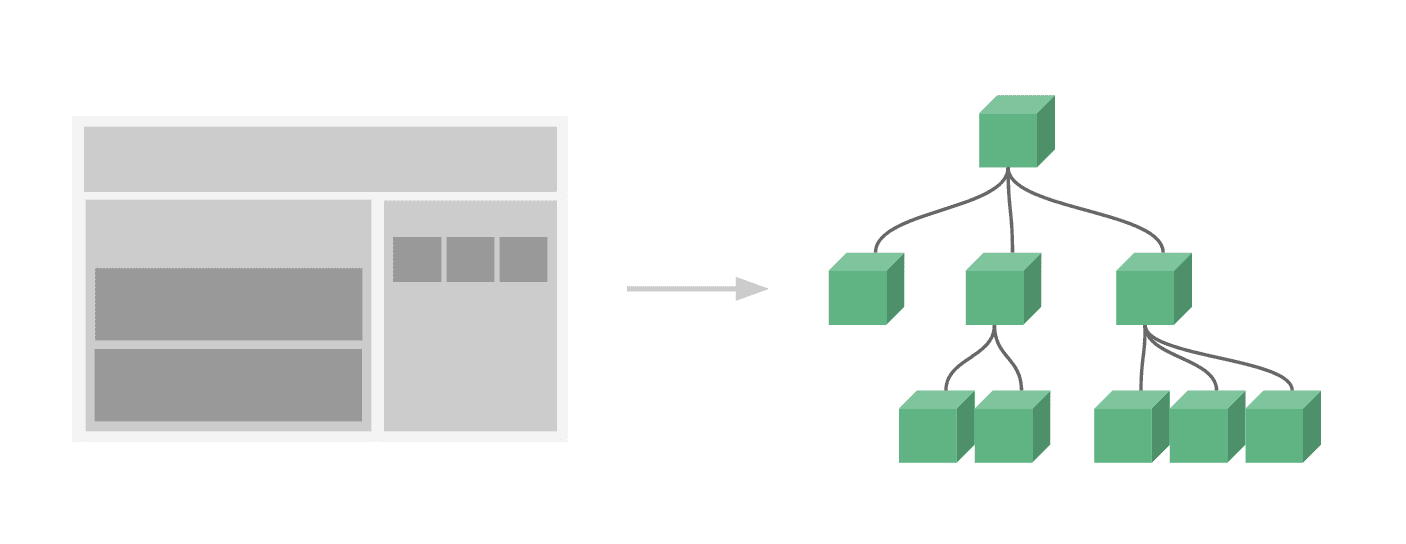
元件概念
 Image
Image
而什麼是 component 呢?
 Image
Image
圖片來源:Vue.js 官網
它的概念是一個網頁中,一些比較常用的組件,例如:nav bar 或是 side bar 等等區塊。這時候使用 component 來控制一個區塊,這樣就會非常好整理以及修改。
下面有一個點擊的範例,是從 Components Basics 稍微做個修改的範例,讓我們試著改成使用 Component 來看看:
let vm = ```
new Vue({
    el: '#app',
  data: {
    count: 0
  },
  methods: {
    plus: function() {
        this.count +=1
    }
  }
})
做一個一樣功能的 component

使用方式如下:

為了跟上面區別,所以定義一個名稱為 click-counter 的 component。
建立 data, 必須是 function,並 return 值。
建立 template,把原本 HTML 中的 template 放入。
建立 methods,跟原本的 methods 一樣。
HTML 只要留有跟 component 同名稱的元素就好。
Vue.component('click-counter', {
data: function() {
return {
count: 0
}
},
template: <button @click="plus"> 我被按了 {{ count }} 下 </button> ,
methods: {
plus: function() {
this.count +=1
}
}
})
<div id="app">
  <click-counter></click-counter>
</div>

這樣的好處是可以讓建立好的 component 可以重複使用,如果你要一次擺 5 個,也是可以的,並且每個都是獨立運行的,想要試玩可以看下方 JSFiddle 建立的範例:

透過 prop 傳遞建立 component

如果想要從外層傳遞資料到內層來建立 component 的話,也就是透過原本的 new Vue() 建立的資料,而不是在 component 中取得資料的話,就可以透過 props 來存取。

建立 Vue.component('component 名稱', {})。
在 component 中建立 template。
在 component 中建立 props,並定義它來獲取資料。
在 HTML 的 component 中綁定 props 定義的名稱,並指定給 data 中的資料。

<div id="app">
  <component-plus
    :compo-count= 'count'  // prop 綁定 count
  >
  </component-plus>
</div>
Vue.component('component-plus', {
props: ['compoCount'], // 透過 prop 傳值
template: <button @click="plus"> 我被按了 {{ compoCount }} 下 // template 中都要使用 props 的名稱,而不是原本的名稱 </button> ,
methods: {
plus: function() {
this.count +=1
}
}
})
let vm = new Vue({
    el: '#app',
  data: {
    count: 0
  }
})

使用效果是一樣的:

注意定義 props 時,命名方式按照官方說明最好使用 camelCase,在 HTML 中則是使用 kebab-case。
並且在定義時,應該盡量詳細,至少指定其類型。雖然這裡例子使用字串組成陣列可以使用,但如果定義詳細一點可以改成以下:
props: { compoCount: String }
使用 x-template 建立 component

在 Vue.js 中,還可以使用另一種方式來建立 component,這邊要介紹的是使用 x-template,這邊使用上面的例子來修改。

建立 Vue.component('component 名稱', {})。
在 HTML 中建立一個 <script type="text/x-template" id="id名稱">,id 將 template 引用過去。
在 component 中建立 template: '#id名稱',放入 id 名稱。
在 component 中建立 props,並定義它來獲取資料。
在 HTML 的 component 中綁定 props 定義的名稱,並指定給 data 中的資料。
在 <script type="text/x-template" id="id名稱"> 中放入要顯示的 template。

<div id="app">
  <component-plus
    :compo-count='count'
  >
  </component-plus>
</div>

<script type="text/x-template" id="componentCount">
    <button @click="plus">
    我被按了 {{ compoCount }} 下
  </button>
</script>

Vue.component('component-plus', {
    template: '#componentCount',
  props: ['compoCount'],
  methods: {
    plus: function() {
        this.compoCount +=1
    }
  }
})

let vm = new Vue({
    el: '#app',
    data: {
    count: 0
  },
})

有些情況,例如 HTML 沒有辦法正確渲染元素時,等等的例子會提到,就可以使用 is 來掛載 template,像下方的例子:

<div
  is="component-plus"
  :compo-count='count'
>
</div>

完成的效果也是一樣:

使用 x-template 顯示表格

前面有提到有些情況下,HTML 會需要使用 is 來掛載顯示正確的畫面,這裏會使用表格的例子來說明。
下方有一個表格,接下來要試著使用 x-template 製作 component:

跟前面提到的使用 x-template 的方法差不多,這邊就不再多做示範,直接上做好的樣子:

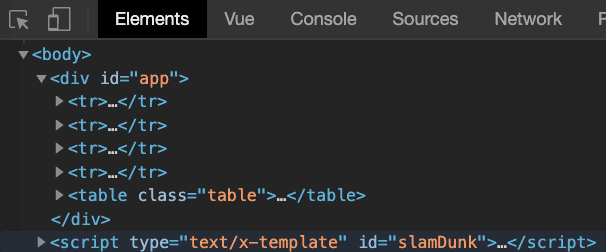
結果出來的樣子跑版了。
打開開發者工具看一下,發現結構怪怪的,只有 4 個 <tr>。

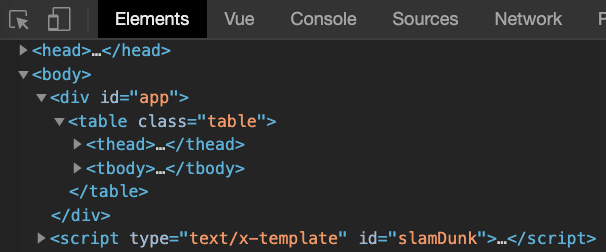
原因是 HTML 的特性,在 <table> 中只能夠放 <tr>,但是這裏卻是放入 component 的模板,所以需要使用 is 來掛載。

<tbody>
  <!-- <slam-dunk
    v-for="(item, key) in data"
    :character="item"
    :key="key"
  >
  </slam-dunk> -->

  <!-- 改成用 is 來掛載 tr -->

  <tr
    is="slam-dunk"
    v-for="(item, key) in data"
    :character="item"
    :key="key"
  >
  </tr>

</tbody>

結構就變正常,資料也可以正確的顯示了。

全局註冊與局部註冊

全局註冊

目前為止,我們都是使用全局註冊來製作 component:
Vue.component('component-name', {})
這樣做的話,如果之後有新創建 Vue 根實例 (new Vue) 的話,就會一起共用:
Vue.component('component-a', {}) Vue.component('component-b', {}) Vue.component('component-c', {})
new Vue({ el: '#app' })
<div id="app">
  <component-a></component-a>
  <component-b></component-b>
  <component-c></component-c>
</div>

局部註冊

根據官網表示,如果使用全局註冊,假設某個 component 不再使用的話,一樣會保留在最終的建構結果中,這樣會造成用戶無謂的下載 JavaScript 資料。
所以更好的用法,會是使用局部註冊:

透過一個物件來定義 component:
var componentA = {}
在 new Vue 中建立 components 並定義要使用的 component:

new Vue({
  el: '#app',
  components: {
    'component-a': componentA
  }
})

把上面的範例改成局部註冊:

要注意的是,局部註冊的組件在其子組件中是不可用的。
如果想要讓 A 組件可以在 B 組件中使用的話,可以這樣寫:

var componentA = {}

var componentB = {
  components: {
    'component-a': componentA
  }
}